
Mangools Low-Competition Keywords: How to Find Easy-to-Rank Keywords (2026)

Why Is Ranking on Google So Hard?
You wrote a great blog post, published it, and waited — but nothing showed up on the first page of Google. This is not just your problem. The majority of bloggers and website owners face exactly the same frustration
The real reason? They are targeting the wrong keywords.
If you are going after broad terms like “best shoes” or “digital marketing,” you are competing directly against massive brands with years of authority and thousands of backlinks. The smart move is to find low-competition keywords — search phrases where the current top results are weak enough for you to outrank them with good content.
In this guide, you will learn:
What low-competition keywords are and why they matter How to use Mangools KWFinder to find them How to read and use the Keyword Difficulty (KD) score The power of long-tail keywords A practical step-by-step strategy you can apply today
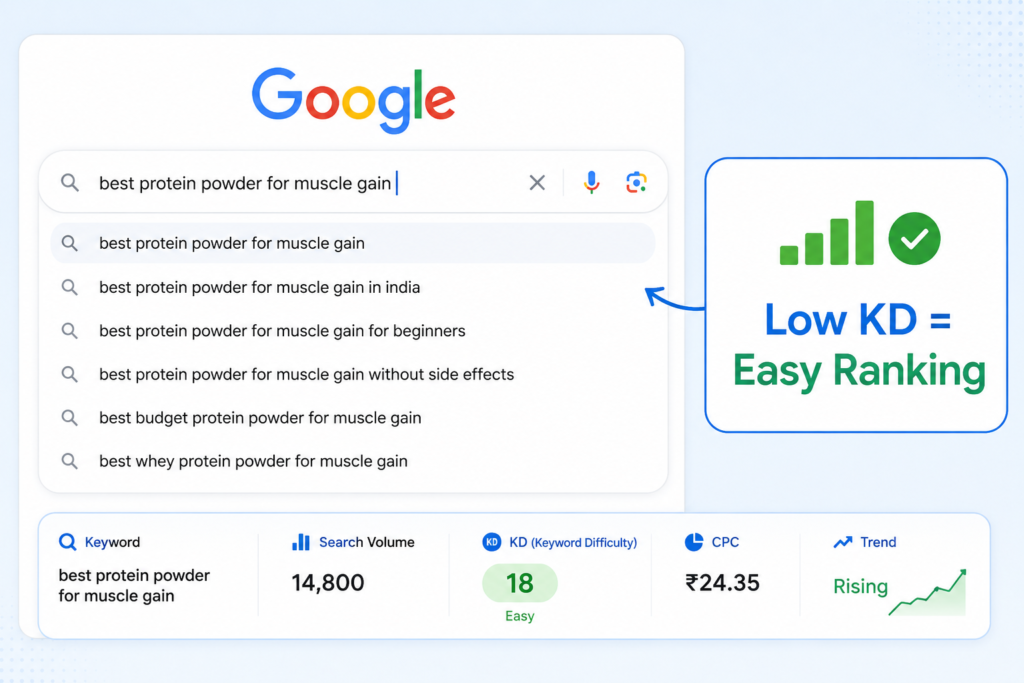
What Is a Low-Competition Keyword?
A low-competition keyword is a search phrase where the websites currently ranking in Google’s top 10 results are relatively weak — meaning you have a realistic chance of outranking them if you create quality, optimized content.
These keywords typically have:
A Keyword Difficulty (KD) score between 0 and 30 A long-tail structure (3 or more words) A specific search intent behind them A smaller but highly targeted audience
Example comparison:
| Keyword | Monthly Volume | KD Score | Competition Level |
|---|---|---|---|
| shoes | 200,000 | 85 | Extremely High |
| best running shoes for flat feet | 5,400 | 32 | Medium |
| best running shoes for flat feet women beginners | 880 | 18 | Low ✅ |
The more specific the keyword, the lower the competition. That is the core principle behind low-competition keyword research.
Why Use Mangools KWFinder?
Mangools is an SEO toolkit built around simplicity and accuracy. Its flagship tool, KWFinder, is designed specifically to help bloggers, affiliate marketers, and small businesses discover low-competition keywords — without needing an expensive enterprise tool.
Key Features of KWFinder:
Keyword Difficulty (KD) Score — a color-coded rating from 0 to 100 that shows how hard it is to rank Monthly Search Volume — accurate estimates of how many people search a keyword each month Long-tail keyword suggestions — hundreds of related ideas generated automatically SERP Analysis — see exactly who is ranking and how strong their pages are Location-based search — find keywords for over 50,000 locations worldwide Search by Domain — discover what keywords your competitors are already ranking for
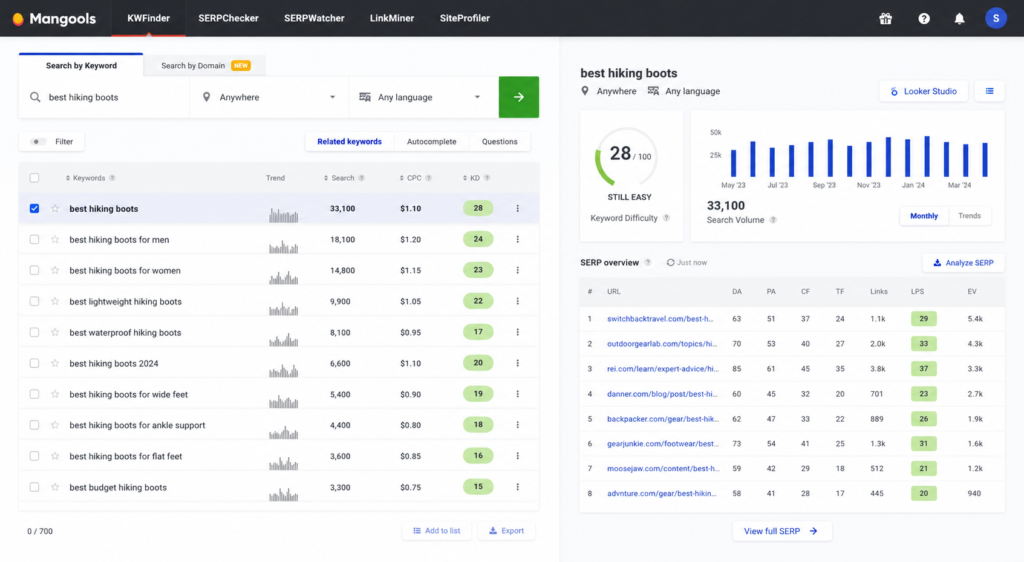
Step-by-Step: How to Find Low-Competition Keywords with Mangools
Step 1: Create Your Mangools Account
Go to Mangools.com Click “Start free trial” — a 10-day free trial is available with no credit card required Log in and open the KWFinder tool
Step 2: Enter a Seed Keyword
tart with a broad seed keyword related to your niche. Do not worry about it being too competitive at this stage — you are just using it to generate ideas.
Examples by niche:
Fitness blog → home workout, weight loss tips
Finance blog → save money, budgeting for beginners
Food blog → easy dinner recipes, meal prep ideas
KWFinder will instantly generate hundreds of related keyword suggestions based on your seed term.
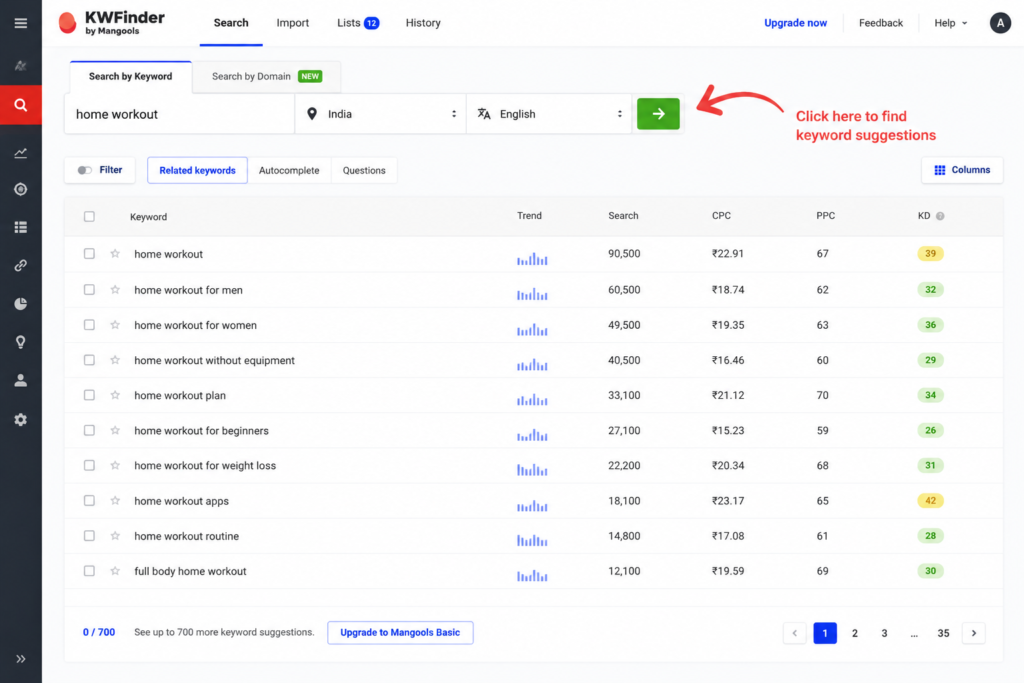
Step 3: Apply the Keyword Difficulty Filter
This is the most important step.
In KWFinder, click the Filter button and set:
- KD: 0 to 30 (ideal for new and growing websites)
- Search Volume: 100 to 5,000 (enough traffic to be worth targeting)
- Word count: 3 or more (to focus on long-tail keywords)
This filter removes all the hard-to-rank keywords and shows you only the ones you can realistically win.
KD Score Color Reference:
| Color | KD Range | Meaning |
|---|---|---|
| 🟢 Green | 0–29 | Easy to rank |
| 🟡 Yellow | 30–49 | Moderate competition |
| 🟠 Orange | 50–69 | Hard to rank |
| 🔴 Red | 70–100 | Very hard — avoid for now |
Step 4: Prioritize Long-Tail Keywords
After applying filters, most of the keywords you see will be long-tail keywords — and that is exactly what you want.
Long-tail keywords work because they:
- Have specific search intent, so the visitor knows exactly what they want
- Drive higher conversion rates than broad terms
- Face far less competition from authority sites
- Align well with voice search queries
Comparison example:
- yoga Broad, high volume, nearly impossible to rank
- yoga for beginners at home without equipment Specific, moderate volume, very achievable
A beginner blog can realistically rank for the second keyword within a few months of publishing a well-optimized post
Step 5: Analyze the SERP Before You Commit
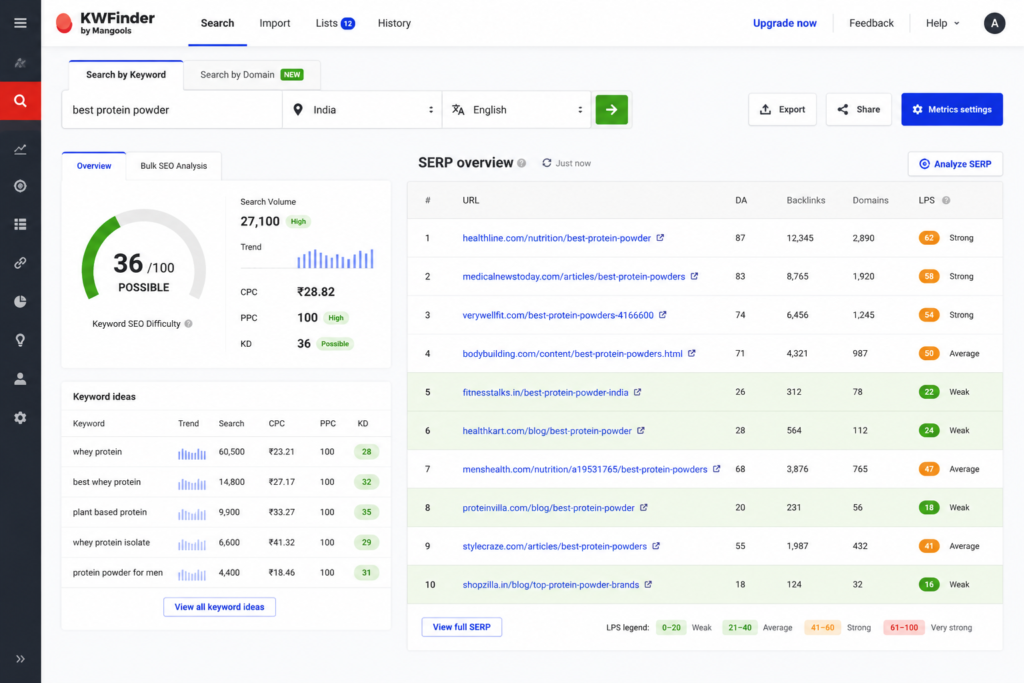
Do not target a keyword just because the KD score looks good. Always check the SERP Preview in KWFinder — this shows you the actual top 10 results for that keyword.
Look for these green signals:
- One or more websites with Domain Authority (DA) below 30
- Pages with 0 to 5 backlinks
- Forum threads, Reddit posts, or thin articles ranking in top positions
- Outdated content (posts from 5+ years ago with no updates)
If you see any of these signals, that keyword is a genuine opportunity. Your well-written, updated content can beat those pages.
Red flags to avoid:
All top 10 results are from large brand websites (DA 70+) Every top page has 100+ backlinks Wikipedia or major news sites dominate the results
Step 6: Use “Search by Domain” to Steal Competitor Keywords
This is an advanced tactic that most beginners overlook.
In KWFinder, click the “Search by Domain” tab and enter the URL of a smaller competitor in your niche — one that already ranks on Google but is not a major authority site.
You will get a full list of every keyword that website ranks for, along with difficulty scores and search volumes. This lets you find proven, rankable keywords that are already working for others.
How to do it:
Search your main keyword on Google
Find a small website on page 1 or 2 with low authority
Copy its URL and paste it into KWFinder’s “Search by Domain”
Filter by low KD and high relevance
Create better, more comprehensive content targeting those keywords
Real Examples: Long-Tail Keywords from One Topic
Here is how you can extract multiple low-competition keyword opportunities from a single broad topic:
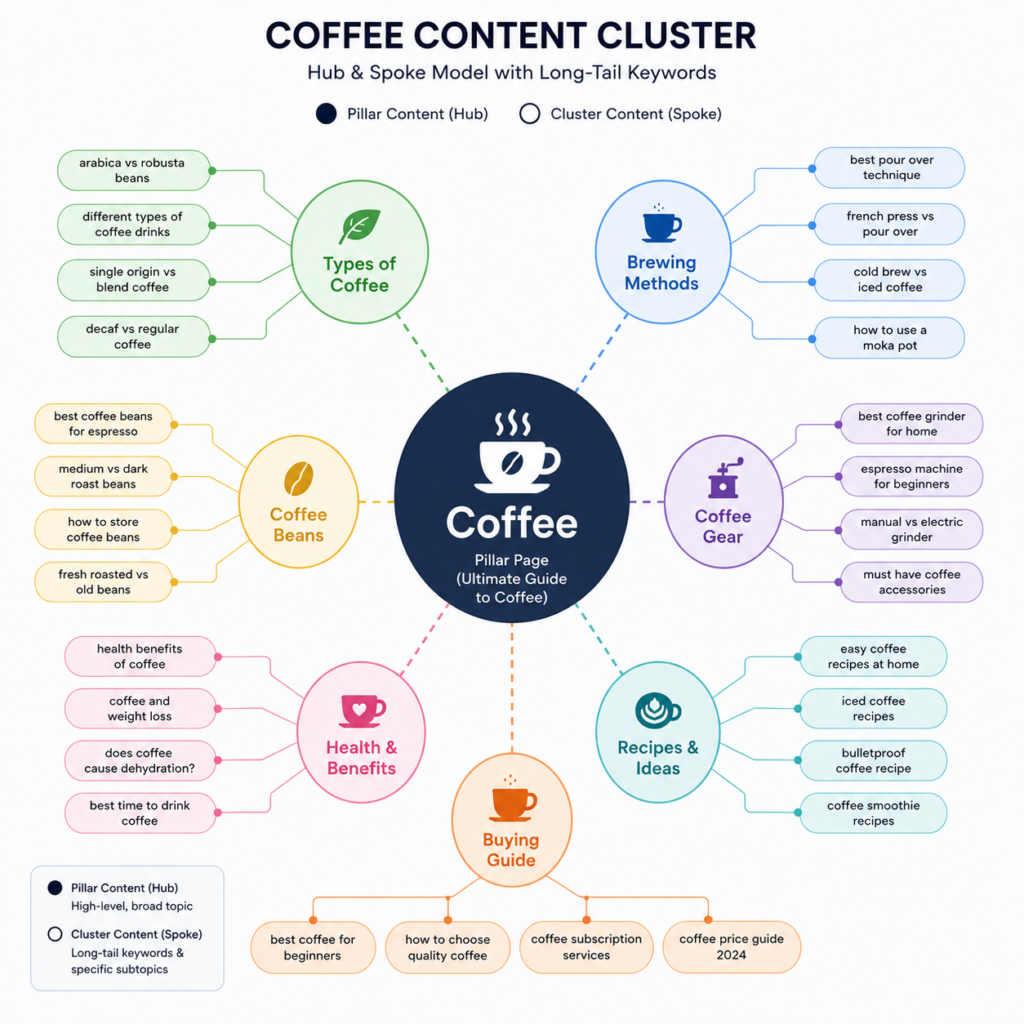
Topic: Coffee
| Long-Tail Keyword | KD | Monthly Volume |
|---|---|---|
| how to make cold brew coffee at home | 22 | 2,400 |
| best coffee beans for espresso beginners | 19 | 1,600 |
| coffee vs tea for weight loss | 28 | 1,900 |
| how much coffee is too much per day | 17 | 3,200 |
| French press coffee ratio for strong coffee | 14 | 880 |
Each of these is a separate blog post opportunity. Together, they form a content cluster that builds your site’s authority around the topic of coffee — and each individual post has a strong chance of ranking.
Common Keyword Research Mistakes to Avoid
Finding a low KD score is not enough on its own. Avoid these mistakes:
1. Ignoring search intent: A keyword might have low competition but if the user’s intent does not match your content, you will not rank — or you will get traffic that immediately bounces. Always ask: what does someone actually want when they search this?
2. Trusting inaccurate free tools: Many free keyword tools provide unreliable data. Mangools KWFinder uses real data sources to give you accurate KD and volume estimates.
3. Targeting one keyword per page: Modern SEO is about covering a topic thoroughly, not stuffing one keyword. A single well-written post can rank for dozens of related variations.
4. Expecting instant results: New content typically takes 3 to 6 months to rank, even for easy keywords. Use Mangools SERPWatcher to track your progress.
5. Writing thin content: Low competition does not mean zero competition. Your post still needs to be genuinely helpful, well-structured, and more comprehensive than what already ranks.
On-Page SEO Checklist for Your Low-Competition Articles
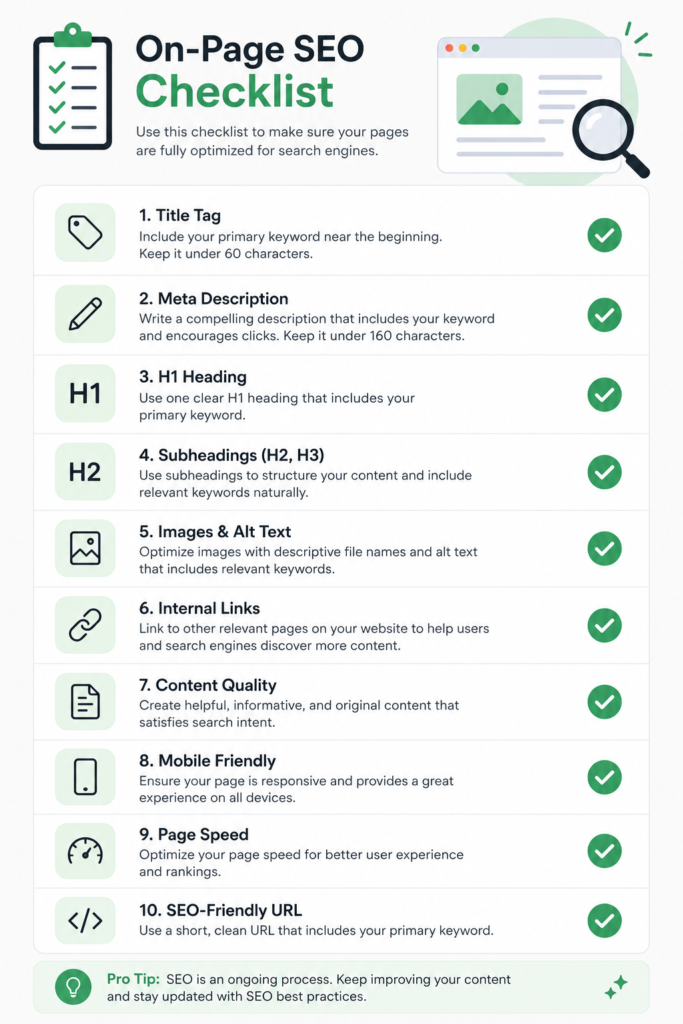
Once you have your keyword, use this checklist to make your content rank-ready:
- Include the keyword at the beginning of your title tag
- Use the keyword in your H1 heading
- Mention the keyword naturally in the first 100 words
- Use keyword variations in H2 and H3 subheadings
- Write a meta description of 150–160 characters that includes the keyword
- Keep your URL short and keyword-focused
- Add alt text to images using the keyword
- Include internal links to related posts on your site
- Aim for 1,000 to 2,000+ words depending on the topic
- Add a FAQ section to target featured snippets
Other Mangools Tools That Support Your Strategy
KWFinder is the starting point, but the full Mangools suite gives you everything you need to execute a complete SEO strategy:
| Tool | Purpose |
|---|---|
| SERPChecker | Deep SERP analysis — see competitor backlinks, DA, and content gaps |
| SERPWatcher | Track your keyword rankings over time with visual graphs |
| LinkMiner | Find backlink opportunities from competitor pages |
| SiteProfiler | Analyze the overall SEO health and authority of any domain |
Start with KWFinder. As your content strategy scales, add the other tools progressively.
Conclusion: Start Finding Easy Keywords Today
Low-competition keyword research is one of the highest-ROI activities in SEO. You do not need a massive budget or years of experience — you need the right tool and a clear process.
Your action plan:
- Sign up for Mangools (free 10-day trial)
- Enter a seed keyword from your niche into KWFinder
- Set the KD filter to 0–30
- Browse long-tail suggestions and pick the best opportunities
- Check the SERP to confirm weak competition
- Use “Search by Domain” to find competitor keywords
- Write genuinely helpful, well-optimized content
- Track rankings with SERPWatcher and repeat the process
Remember — one well-targeted low-competition keyword can bring consistent organic traffic for months or even years. The investment of 10 minutes in keyword research pays off every single day.
Frequently Asked Questions (FAQ)
Q1: Is Mangools KWFinder free to use? Mangools offers a 10-day free trial with full access to all tools. After the trial, paid plans are available starting at an affordable monthly rate. A limited number of free searches are also available daily without a paid subscription.
Q2: What KD score is safe for a beginner website? For brand-new websites, aim for keywords with a KD of 0–20. Once your site has been around for 3 to 6 months and has some content published, you can begin targeting keywords up to KD 30.
Q3: Does a low KD score guarantee ranking? No. KD is a guide, not a guarantee. Your content still needs to be well-written, properly optimized, and more helpful than the pages currently ranking. KD tells you the door is open — your content has to walk through it.
Q4: Can Mangools find keywords for non-English languages and local markets? Yes. KWFinder supports keyword research in multiple languages and over 50,000 locations. You can target specific countries, cities, and regional audiences with accurate local data.
Q5: Are long-tail keywords worth targeting if the search volume is low? Absolutely. A keyword with 200 monthly searches that you actually rank for is far more valuable than a keyword with 50,000 monthly searches that you never crack the first page for. Ten low-volume keywords ranking together can drive thousands of targeted visits every month.
Last Updated: 2026 | Reference: Mangools Blog — Keyword Research Guide